LESCO Online Bill
Your LESCO online bill is one search away. Type the 14-digit reference number from any old Lahore Electric Supply Company bill. The official bill then opens below, ready to print or save as a PDF. It covers every LESCO connection in Lahore, Kasur, Okara, Sheikhupura and Nankana Sahib.
How to Check Your LESCO Online Bill
To check your LESCO online bill, enter the 14-digit reference number from the top left of any LESCO bill in the box above and press Check Bill. The latest bill opens in a few seconds. If you only have the 10-digit Customer ID, switch the box to Customer ID first.
On this page
- How to Check Your LESCO Online Bill
- Where the Reference Number Sits on a LESCO Bill
- LESCO Duplicate Bill: Print, PDF and Proof of Payment
- Renting in Lahore? Check the LESCO Bill First
- Areas Covered by LESCO
- Why Your LESCO Bill Changed This Month
- Estimate Your Next LESCO Bill Before It Arrives
- New LESCO Connection, Name Change and Load Increase
- Power Cuts and Your Feeder Name
- Detection Bills: What LESCO Can and Cannot Charge
- LESCO Complaints: 118, the Power Smart App and NEPRA
- LESCO Smart Meters: What Is Changing
- Solar Homes in Lahore: Reading the Export Units
- Is LESCO Being Privatised?
- LESCO Bill FAQs
- Check Your LESCO Online Bill Now
Most people get it right first time. Still, a few small details trip up a surprising number of Lahore households, so here is the full routine:
- Take any LESCO bill, old or new. The reference number never changes for a connection.
- Copy the long number printed beside Reference No. Ignore the single letter (often U or R) at the end.
- Paste or type it into the search box. The box strips out spaces and dashes for you.
- Check the billing month at the top of the result. Early in the month, last month’s bill may still be the latest one.
- Press Print / Save PDF if you need a copy for a bank, a landlord or your own records.
Families in Lahore often look after more than one meter. For example, one son may handle the parents’ house in Samanabad, a rented flat in Johar Town and a shop in Anarkali. In that case, the search box remembers your recent numbers on your own phone, so next month each LESCO bill is one tap away.
Where the Reference Number Sits on a LESCO Bill
The number you need sits in the top-left block of the bill, under the heading Reference No. On a LESCO bill it is printed as a short batch number, a five-digit sub-division code and a seven-digit connection number, followed by a letter. Together they make the 14 digits that identify your meter.
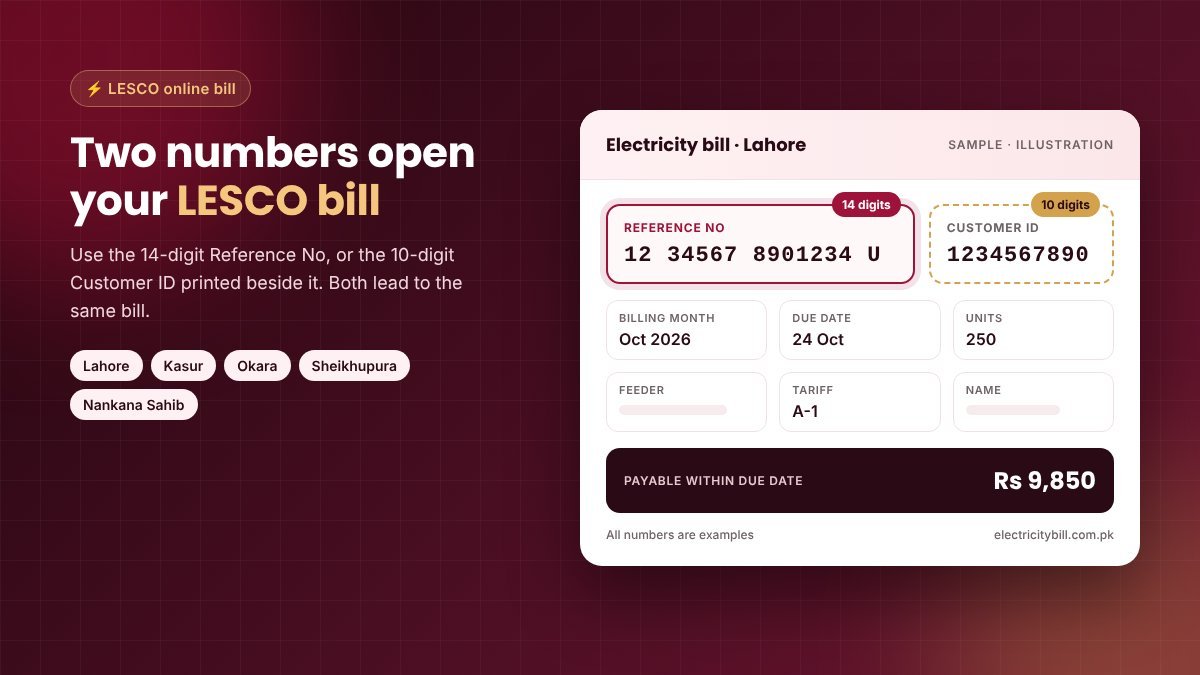
Right next to it, you will also see the Customer ID, a 10-digit number. Both lead to the same bill, so use whichever one you have. However, keep in mind that the reference number is the one banks, JazzCash and Easypaisa ask for.
LESCO Duplicate Bill: Print, PDF and Proof of Payment
A LESCO duplicate bill is simply a fresh copy of your current bill. It carries the same amount, due date and reference number as the paper bill, so banks and post offices accept a clear printout. That matters in Lahore, where paper bills sometimes land a few days late or end up with the wrong flat in a building.
Here is when people usually need one:
- The paper bill never arrived. The due date doesn’t move just because the paper is late, so download the LESCO web bill and pay on time.
- You need proof of address. Many offices accept a recent electricity bill. A printed duplicate works, especially if it shows the paid stamp from your bank.
- You rent out a property. Send the PDF to your tenant on WhatsApp instead of chasing the paper copy.
- You want to check a payment. The next month’s bill shows your last payment in the history table, so you can confirm that LESCO recorded it.
The search shows the latest bill only. However, every LESCO bill prints a twelve-month history of units and payments at the bottom. For a full copy of an older month, ask your sub-division office or the customer service centre.
Renting in Lahore? Check the LESCO Bill First
Lahore has a huge rental market, and the electricity bill causes more landlord-tenant arguments than almost anything else. A two-minute LESCO online bill check before you sign a lease can save you months of trouble.
Before you move in, ask the landlord for the reference number and look up the latest bill. Then check three things:
- Arrears. Unpaid amounts stay with the meter, not with the person who ran them up. If the bill shows arrears, ask the landlord to clear them before you take the keys.
- Tariff category. A flat billed as commercial pays far more per unit than a domestic one. So make sure the bill says domestic if you are renting a home.
- Recent units. The twelve-month history shows how much the last tenant used. It gives you a realistic idea of summer bills before you commit.
Once you live there, keep paying on time and save each month’s PDF. If you move out, take a final meter photo with the date, because that reading settles who owes what.
Areas Covered by LESCO
LESCO serves Lahore and four neighbouring districts. According to ProPakistani, the company has about 7.05 million consumers and runs its network through eight operation circles and 41 divisions.
| District | Well-known towns and localities |
|---|---|
| Lahore | Gulberg, Model Town, DHA, Johar Town, Shahdara, Raiwind |
| Kasur | Kasur city, Pattoki, Chunian, Kot Radha Kishan |
| Okara | Okara city, Renala Khurd, Depalpur |
| Sheikhupura | Sheikhupura city, Muridke, Ferozewala, Sharaqpur |
| Nankana Sahib | Nankana city, Shahkot, Sangla Hill |
If your bill shows a different company name, you are not a LESCO customer. For instance, Gujranwala and Sialkot fall under GEPCO, while Faisalabad has its own FESCO page.
Interestingly, the name itself has a long history. The original Lahore Electric Supply Company was founded in 1912 by Lala Harkishen Lal, as Wikipedia records. Today’s LESCO, by contrast, is the state-owned distribution company formed in 1998 when WAPDA split up its power business.
Why Your LESCO Bill Changed This Month
Lahore summers are hard on electricity bills. From May to September, an air conditioner running through the night can push a home well past 200 units, and that line changes everything. So before you blame the meter, check these four things on your LESCO online bill:
- Units consumed. Compare them with the same month last year in the history table. A jump in June or July is usually the weather, not a fault.
- Protected status. A home that crosses 200 units even once loses protected rates for six months. We explain the rule in detail in our protected vs unprotected guide.
- Fuel and quarterly adjustments. NEPRA adds or removes an amount per unit each month. Our adjustments table lists the latest rates.
- Reading dates. If the gap between two readings is 34 or 35 days instead of 30, you pay for the extra days too.
A quick example makes the 200-unit line clear. Say your home used 190 units in April and 230 in June. The June bill moves to unprotected rates, and the next five bills stay there even if you cut back. That one hot month can therefore cost more than its own bill.
Estimate Your Next LESCO Bill Before It Arrives
People search for a LESCO bill calculator every month, mostly because they want to know the damage before the paper lands. You can get a close estimate from your current LESCO online bill, because it already shows the rates that apply to your connection.
Follow this quick method:
- Open this month’s bill and find cost of electricity and units consumed.
- Divide the cost by the units. That gives your own average rate per unit.
- Multiply that rate by the units you expect next month. Your meter shows how many you have used so far.
- Add the fixed charges from the current bill, since they rarely change month to month.
- Finally, add about a fifth for sales tax and adjustments. Your bill’s tax lines show the exact share.
| Step | Figure from the bill | Result |
|---|---|---|
| Cost of electricity this month | Rs7,500 for 250 units | Rs30 per unit on average |
| Expected units next month | 300 units (meter checked mid-month) | 300 × Rs30 = Rs9,000 |
| Fixed charges | Rs700 | Rs9,700 |
| Tax and adjustments (about 20%) | Varies by month | Roughly Rs11,600 in total |
Keep in mind, though, that crossing a slab can raise your average rate, so treat the result as a floor rather than a promise. Even so, it is accurate enough to decide whether to switch off the second AC this week.
New LESCO Connection, Name Change and Load Increase
Besides the monthly bill, three services bring most people to a LESCO office. Here is where each one starts:
- New connection. Apply through the government’s Power Smart app or at a LESCO customer service centre with your CNIC and proof of ownership or tenancy. Once LESCO approves it, you pay the demand notice and the meter is installed.
- Name change. The owner applies with a CNIC and proof of ownership, such as a registry or allotment letter. The reference number stays the same, so your LESCO online bill keeps working after the change.
- Load increase. If you add an AC or an electric geyser, your sanctioned load may be too low. Apply to raise it, because fixed charges and some penalties depend on the sanctioned load.
LESCO also simplified metering for new homes. From September 2025, it fits one AMI smart meter on a new connection instead of two. A backup meter is no longer mandatory either, even for solar users, according to Daily Times.
Power Cuts and Your Feeder Name
Every LESCO bill prints your feeder name and code near the top, so look for it next time you open your LESCO online bill. The feeder is the line from the grid station that supplies your street, and outages are planned and reported feeder by feeder.
So when you dial 118 about a power cut, give your reference number and the feeder name. The complaint then reaches the right line staff straight away. Feeders with heavy losses or theft usually face longer load management, which is why two nearby streets can see different outage hours.
Detection Bills: What LESCO Can and Cannot Charge
In simple terms, a detection bill is an extra charge for units the company says your meter failed to record. It often follows a meter change, a burnt meter or a theft inspection. Understandably, it is also the LESCO bill that causes the most stress, because the amount can be large and arrive months later.
Fortunately, the rules protect you more than many people realise. In a decision dated 23 July 2026, NEPRA’s complaints committee ordered LESCO to withdraw a 267-unit detection bill. LESCO had read the data from a removed meter about eleven months after replacing it. NEPRA noted that, under the Consumer Service Manual, units can’t be charged if the data isn’t retrieved within three months of the meter change. It also ordered LESCO to revise the disputed months on the average-billing formula. You can read the full NEPRA decision.
If a detection bill lands on your LESCO online bill, work through these steps:
LESCO Complaints: 118, the Power Smart App and NEPRA
For a power cut, a sparking pole or a billing error, start with LESCO’s own channels, then move up only if they fail. The route below keeps a paper trail at every stage.
| Problem | First stop | If it isn’t fixed |
|---|---|---|
| Power outage or fault | Dial 118 from any phone and note the complaint number | Visit your sub-division office with that number |
| Wrong reading or inflated units | Photograph your meter and lodge a complaint at the sub-division office | File a complaint with NEPRA |
| Detection bill | Ask the sub-division office for the detection proforma | NEPRA, with copies of all bills |
| New meter, name change or load change | The Power Smart app or the customer service centre | Your circle office |
| Disconnection after payment | Show the paid bill or the transaction ID at the sub-division office | 118, then NEPRA |
The government’s Power Smart app also lets you send your own meter reading with a photo, under the “Apna Meter, Apni Reading” scheme. More than a million people now use it, according to Profit. As a result, an estimated reading becomes much harder to justify.
LESCO Smart Meters: What Is Changing
LESCO plans to move its whole customer base to smart (AMI) meters by 2029, as Business Recorder reported. A smart meter sends its reading to the company automatically, so nobody has to visit your gate, and estimated bills should become rare.
However, the rollout is gradual. In September 2026, Daily Pakistan reported that LESCO had started buying about 297,000 single-phase AMI meters, at an estimated cost of Rs5 billion. New connections get them first. Meanwhile, faulty meters are still replaced with ordinary static meters until the regulator approves more funding.
For you, nothing changes in how you check the bill, so your LESCO online bill search works the same way. The reference number stays the same, and your LESCO online bill appears here exactly as before.
Solar Homes in Lahore: Reading the Export Units
Over the last few years, rooftop solar has spread fast across Lahore’s housing societies. With a two-way meter, your LESCO bill shows import units, the power you took from the grid. It also shows export units, the power your panels sent back. Your bill credits the exported units at the buyback rate in your agreement.
In practice, check three lines on your LESCO online bill every month: imported units, exported units and the net amount. If the export figure is zero on a sunny month, your meter or its reading needs attention. The rules for new and existing solar users differ, and our net metering and net billing section explains the current rates.
Is LESCO Being Privatised?
Yes, it is on the list. In August 2026, the government decided to privatise LESCO and MEPCO in their existing form. It dropped the idea of first splitting them into smaller companies, as ProPakistani reported. The Privatisation Commission is now hiring a financial adviser for the sale.
For now, though, your bill doesn’t change. Bills still come through the same PITC system, the reference number stays the same, and you pay through the same banks and apps. Tariffs, moreover, are set by NEPRA and the federal government, not by the company’s owner. We will update this page if anything about the LESCO online bill changes after a sale.
LESCO Bill FAQs
01Can I check my LESCO bill by name or CNIC?
No. The LESCO online bill system finds bills only by the 14-digit reference number or the 10-digit Customer ID. If you have lost both, take your CNIC and address to the sub-division office, and the staff can look up the number.
02Is the LESCO web bill the same as the paper bill?
Yes. The web bill and the paper bill come from the same record, so the amount, due date and reference number match. Only the paper and print quality differ.
03Why does my LESCO online bill show last month?
Your new bill isn’t issued yet. LESCO bills its batches on different days, so a neighbour may get the new bill a week before you. Check again in a day or two, and keep an eye on the billing month at the top.
04Can I pay my LESCO bill online?
Yes. Once you have checked your LESCO online bill, every banking app, JazzCash and Easypaisa accept LESCO bills. Choose electricity, then LESCO, enter the reference number and confirm the amount before you pay.
05How do I know LESCO received my payment?
Keep the transaction ID or stamped receipt. Your next LESCO bill then shows the payment in the history table. If it doesn’t, take the receipt to your sub-division office before the next due date.
06What are LESCO’s peak hours?
They change with the season. According to Profit, the peak window runs about 6 to 10 pm in spring and 7 to 11 pm in summer. Peak hours matter mainly for three-phase and commercial time-of-use meters, and your bill prints the exact window.
07My bill shows a huge arrears figure. What should I do?
First, check the history table to see which month the arrears started. If you paid that month, take the receipt to the sub-division office and ask them to correct the record. If you didn’t, ask about an instalment plan before the due date.
08What happens if my LESCO meter is burnt or faulty?
Report it on 118 or at your sub-division office straight away. Until the new meter is fitted, LESCO usually charges an average bill based on your past use. So compare those bills with your history, and remember the three-month rule for any later detection charge.
09When does the first bill for a new LESCO connection appear online?
The first bill appears after the first meter reading, which usually takes a few weeks. Ask the office for your new reference number when the meter is installed, then check the LESCO online bill from the next billing cycle.
10Is this the official LESCO website?
No. The official site is lesco.gov.pk. We are an independent service that fetches your LESCO online bill from the official PITC portal and shows it to you unchanged.
Check Your LESCO Online Bill Now
That’s everything you need for a smooth month with LESCO. In short, your next LESCO online bill check takes less than a minute: scroll up, enter the reference number, and print or save the bill.
Last reviewed: October 2026. Figures for consumers, circles, smart meters and privatisation come from the sources linked in each section.
Disclaimer: ElectricityBill is an independent service with no link to LESCO, PITC, NEPRA or WAPDA. Your bill appears exactly as the official PITC portal issues it.
Type the 14-digit reference number from any LESCO bill and the official copy opens in seconds.
Open the bill search- Consumers
- About 7.05 million
- Operation circles
- 8
- Divisions
- 41
- Districts
- 5
- Complaints
- Dial 118
- Official site
- lesco.gov.pk