GEPCO Online Bill
Get your GEPCO online bill in seconds. Type the 14-digit reference number from any Gujranwala Electric Power Company bill, and the official copy opens right here, ready to download, print or pay. Moreover, it covers every GEPCO connection in Gujranwala, Sialkot, Gujrat, Narowal, Hafizabad, Mandi Bahauddin and Wazirabad.
GEPCO Online Bill in Two Minutes
Enter the 14-digit reference number from the top left of your GEPCO bill in the search box above and press Check Bill. The latest GEPCO online bill opens within seconds. No account, password or app is needed, and the 10-digit Customer ID works too.
That’s really all there is to it. Still, one tip saves a lot of confusion: look at the billing month at the top of the result. GEPCO issues bills in batches across the month, so in the first few days of a cycle you may still see last month’s bill. If so, simply check again a day or two later.
On this page
- GEPCO Online Bill in Two Minutes
- Paper Bill or Online Duplicate? A Side-by-Side Look
- Is Your GEPCO Bill Paid? Four Ways to Confirm
- How to Pay a GEPCO Online Bill
- GEPCO’s 2026 Report Card
- Districts and Towns GEPCO Serves
- GEPCO Bills for Exporters and Factories
- When Something Goes Wrong
- Living Abroad? Manage a GEPCO Bill From Anywhere
- New GEPCO Connection and Other Services
- Selling or Leaving a Property: The Final GEPCO Bill
- GEPCO Privatisation: Nine Bidders Prequalified
- GEPCO Online Bill FAQs
- Get Your GEPCO Online Bill Now
Paper Bill or Online Duplicate? A Side-by-Side Look
Many people still wait for the paper bill, then panic when it arrives late. Yet the GEPCO online bill is the same document, available earlier and from anywhere. Here is how the two compare:
| What matters | Paper bill | GEPCO online bill (duplicate) |
|---|---|---|
| When you get it | When the meter reader or postman delivers it | As soon as GEPCO issues it |
| Amount and due date | Official | Identical, from the same record |
| Accepted for payment | Yes | Yes, as a printout or straight in a payment app |
| Where it can go missing | Wrong gate, rain, a neighbour’s house | Nowhere; check it again any time |
| History of units and payments | Twelve months at the bottom | The same twelve-month history |
| Good for paperwork | Yes | Yes, when printed clearly |
In other words, the online duplicate is not a lesser copy. For most purposes it is the better one, because it never gets lost.
Is Your GEPCO Bill Paid? Four Ways to Confirm
“Did my payment go through?” is one of the most common GEPCO questions, especially after paying in an app near the due date. Here is how to be sure:
- Check the app receipt. Every banking, JazzCash or Easypaisa payment gives a transaction ID. So if you have one, the payment has left your account.
- Look at your next GEPCO online bill. Then, the payment history table at the bottom lists the amount and the date GEPCO recorded it.
- Watch the arrears line. If last month’s payment posted, the next bill shows no arrears for that month.
- Ask the office if it’s missing. Take the transaction ID or stamped receipt to your sub-division office before the next due date, and ask them to post the payment.
How to Pay a GEPCO Online Bill
Once your GEPCO online bill is open, paying it takes about a minute. Every channel uses the same 14-digit reference number, so keep it handy.
In a banking app:
- Open the app and tap Bill payment or Utility bills.
- Choose Electricity, then GEPCO.
- Enter the 14-digit reference number. The app fetches the amount due.
- Check the amount against your bill, then confirm with your PIN or OTP.
- Save the receipt or screenshot the transaction ID.
With JazzCash or Easypaisa: open the app, go to Bills, pick Electricity and then GEPCO, and follow the same steps. You can also pay at any of their shop agents with the reference number.
At a counter: bank branches and post offices also accept the paper bill or a clear printout of the duplicate. However, avoid the last day of the due date, when queues grow long.
GEPCO’s 2026 Report Card
Among Pakistan’s state-owned power companies, GEPCO has become the one others are measured against, and for good reason. Its results for the 2025-26 financial year, reported by The Express Tribune, stand out:
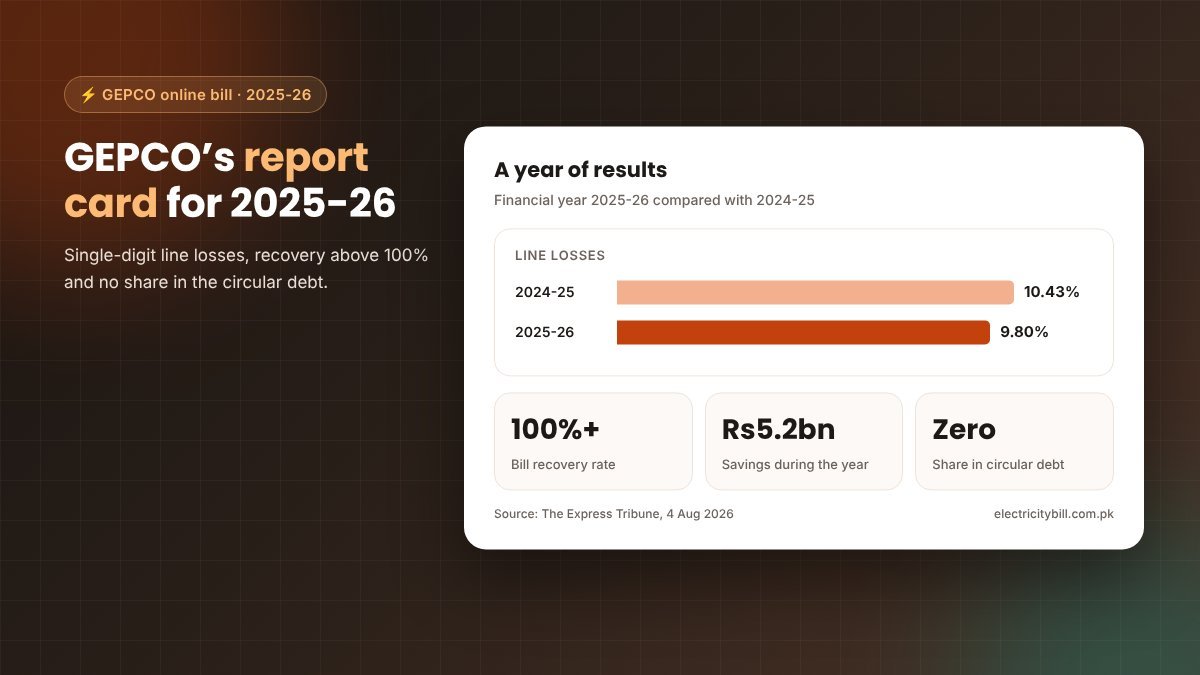
What do these numbers mean for you? Lower line losses mean less electricity is lost or stolen on the way to your meter. In turn, that can mean fewer high-loss feeders and less load management in many areas. A recovery rate above 100% means GEPCO collected more than it billed for the year, including old arrears. The same report also says GEPCO cut the time to replace a faulty meter to within one month, which matters if you are stuck on average bills.
Districts and Towns GEPCO Serves
Altogether, GEPCO supplies about 5.1 million consumers, according to Nukta, across seven districts of north-eastern Punjab. If your town appears below, your bill comes from GEPCO and the search above will find it.
| District | Main towns |
|---|---|
| Gujranwala | Gujranwala city, Kamoke, Nowshera Virkan |
| Wazirabad | Wazirabad, Alipur Chatha |
| Sialkot | Sialkot city, Daska, Sambrial, Pasrur |
| Narowal | Narowal, Shakargarh, Zafarwal |
| Gujrat | Gujrat city, Kharian, Lalamusa, Sarai Alamgir |
| Hafizabad | Hafizabad, Pindi Bhattian |
| Mandi Bahauddin | Mandi Bahauddin, Phalia, Malakwal |
GEPCO Bills for Exporters and Factories
Few regions in Pakistan pack in as much industry as GEPCO’s, so business bills matter here. Sialkot makes footballs, surgical instruments and leather goods for the world, while Gujranwala builds fans, steel and sanitary ware, and Gujrat turns out fans and furniture. Consequently, a large share of GEPCO bills are commercial or industrial.
If you run a workshop or factory, three parts of the bill deserve a monthly review:
- Peak and off-peak units. Industrial meters record time of use. The peak window moves with the season, about 6 to 10 pm in spring and 7 to 11 pm in summer, according to Profit. Therefore, shifting heavy machines out of it lowers the bill directly.
- Maximum demand (MDI). The highest load drawn during the month sets part of the charge. So starting every machine at once creates a spike that you then pay for all month.
- Power factor. Machines with large motors can drag the power factor down, and many industrial tariffs charge for that. For that reason, a properly sized capacitor bank often pays for itself.
For exporters, there is also one more habit worth building: save every month’s GEPCO online bill as a PDF. Buyers’ audits and bank loan files increasingly ask for utility records, and a tidy folder saves a scramble.
When Something Goes Wrong
Most GEPCO problems fall into four familiar types. Each one has its own quickest fix.
The power is out
Dial 118 and give your reference number. Also mention the feeder name printed on your GEPCO bill, so the complaint reaches the right line staff. Then note the complaint number.
The reading looks wrong
First, photograph your meter with today’s date and compare it with the present reading on the bill. If the bill is higher, take the photo to your sub-division office. Alternatively, upload your own reading on the reading date through the government’s Power Smart app.
The meter is burnt or faulty
Report it on 118 straight away. Until a new meter is fitted, GEPCO bills an average based on your past use. Since GEPCO now aims to replace faulty meters within a month, push for a date if it takes longer.
The bill is in the old owner’s name
That is normal after a sale; the name changes only when the new owner applies. So take your CNIC and the registry or sale deed to the sub-division office. Meanwhile, the reference number stays the same, so your GEPCO online bill keeps working throughout.
Finally, if GEPCO doesn’t resolve a billing dispute, you can take it to NEPRA, the regulator. Keep every bill, receipt and complaint number.
Living Abroad? Manage a GEPCO Bill From Anywhere
Gujrat, Kharian, Mandi Bahauddin and Sialkot send more people abroad than almost any other part of Pakistan. As a result, thousands of GEPCO bills are paid by someone sitting in Dubai, Milan or Oslo for a family home back in Punjab.
The GEPCO online bill makes that easy. Keep the reference number in your phone, then check the bill each month from wherever you are. If the amount looks high, you can spot it before your family pays and ask them to photograph the meter.
To pay from abroad, you have a few options:
- A Pakistani banking app. Most local banks’ apps work overseas, so you can pay exactly as you would at home.
- A Roshan Digital Account. Many overseas Pakistanis hold one. Still, check with your bank whether it allows utility bill payments.
- Family in Pakistan. Share the PDF on WhatsApp, and a relative pays in their own app or at a counter.
Either way, ask whoever pays to send you the transaction ID. That way, you can check that the next GEPCO online bill shows the payment.
New GEPCO Connection and Other Services
Besides the monthly bill, a handful of services bring people to GEPCO. Here is where each one starts and what to bring:
| Service | Where to apply | Bring |
|---|---|---|
| New connection | The Power Smart app or a GEPCO customer service centre | CNIC, proof of ownership or tenancy |
| Name change | Your sub-division office | Owner’s CNIC, registry or sale deed |
| Load increase | Customer service centre or the Power Smart app | Your latest bill and a list of new appliances |
| Faulty or burnt meter | Dial 118, then the sub-division office | Your latest bill and the complaint number |
| Tariff correction | Your sub-division office | Your bill and proof of how the premises are used |
Selling or Leaving a Property: The Final GEPCO Bill
Moving out of a house in Gujranwala or selling a shop in Sialkot? The electricity connection needs a little attention, because unpaid amounts stay with the meter, not with the person who used the power.
Before you hand over the keys, work through this short list:
- Take a final meter photo with the date visible. That reading settles who pays for which units.
- Check the latest GEPCO online bill for arrears, and clear them or agree in writing who will.
- Decide what happens to the connection. If the buyer keeps it, they apply for a name change. If nobody needs it, you can apply for permanent disconnection at the sub-division office.
- Ask about the security deposit. You paid one with the original demand notice. When a connection is permanently disconnected, ask the office how to claim it back, and bring the original receipt if you still have it.
Buying instead? Then do the same check from the other side. Look up the GEPCO online bill before you pay, and make sure the seller clears any arrears. It is also worth checking that the tariff matches how you will use the premises, since a home billed as commercial pays far more. Our tariff guide shows the difference.
GEPCO Privatisation: Nine Bidders Prequalified
GEPCO is one of three power companies in the first round of privatisation, alongside FESCO and IESCO. Specifically, the government is offering between 51% and 100% of the shares with management control.
In October 2026, the Privatisation Commission’s board prequalified nine of the eleven parties that applied for GEPCO, as The Express Tribune reported. Together, they include three Turkish energy companies, Engro Energy, Sapphire Fibres, and consortiums led by Hub Power, Shirazi Investments, Artistic Milliners and AKD Securities. K-Electric withdrew its interest. The bidders now move to due diligence.
For bill payers, nothing changes yet. NEPRA still sets the tariff, PITC still issues the bill, and your reference number stays the same. We will update this page as the sale progresses.
GEPCO Online Bill FAQs
01How do I check my GEPCO online bill?
Enter the 14-digit reference number from any GEPCO bill in the search box at the top of this page and press Check Bill. Your latest bill opens within seconds.
02Can I download a GEPCO duplicate bill as a PDF?
Yes. Open your GEPCO online bill above and press Print / Save PDF. On a phone, then choose Save as PDF as the printer.
03Can I check a GEPCO bill by CNIC or name?
No. The system finds bills only by the 14-digit reference number or the 10-digit Customer ID. Your sub-division office can find the number from your CNIC and address if you have lost it.
04How can I see whether my GEPCO bill is paid?
Keep the transaction ID from your payment, then check the payment history on your next GEPCO online bill. If the payment is missing, take the receipt to your sub-division office.
05Does GEPCO cover Wazirabad?
Yes. Although Wazirabad became a separate district, it remains in GEPCO’s area, along with Gujranwala, Sialkot, Narowal, Gujrat, Hafizabad and Mandi Bahauddin.
06Why is my GEPCO bill higher when my units are the same?
Usually because of the monthly fuel adjustment or the quarterly adjustment, which NEPRA sets for every company. Our adjustments table lists the latest rates. Arrears or a late payment surcharge from last month can also show up. Check those lines first.
07Will the reference number change after privatisation?
There is no announcement of that. For now, your reference number, your GEPCO online bill and your payment options all stay the same.
08What is the GEPCO helpline number?
Dial 118 from any phone for power cuts, faults and complaints. The call then reaches GEPCO’s complaint centre, which logs it with your reference number.
09How long does a GEPCO payment take to show?
App and bank payments usually reach GEPCO within a day or two, although end-of-month payments can take longer. After that, your next GEPCO online bill confirms the payment in its history table.
10Is this the official GEPCO website?
No. The official site is gepco.com.pk. We are an independent service that fetches your GEPCO online bill from the official PITC portal and shows it unchanged.
Get Your GEPCO Online Bill Now
All in all, GEPCO makes billing easier than most. Your next GEPCO online bill is one quick search away: scroll up, type the 14 digits, and download, print or pay.
Last reviewed: October 2026. Performance, consumer and privatisation figures come from the sources linked in each section.
Disclaimer: ElectricityBill is an independent service with no link to GEPCO, PITC, NEPRA or WAPDA. Every bill appears exactly as the official PITC portal issues it.
Type the 14-digit reference number from any GEPCO bill and the official copy opens in seconds.
Open the bill search- Consumers
- About 5.1 million
- Districts
- 7
- Line losses 2025-26
- 9.80%
- Bill recovery
- Above 100%
- Complaints
- Dial 118
- Official site
- gepco.com.pk